A TV wall mount can free up space and give a room a cleaner appearance, but choosing one involves more than matching it to your screen size. The mount also needs to support the TV’s weight, fit its mounting holes, work with the wall, and position the screen comfortably.
The best choice depends on how you use the room. A fixed mount may be ideal when you sit directly in front of the TV, while a full-motion mount can make sense when viewers watch from different areas.
Before buying, check the following details on both the TV and the mount.
Compare the Main Types of TV Wall Mounts
Fixed Mounts
A fixed mount holds the TV close to the wall without allowing much movement after installation.
It works well when the screen can be positioned at a comfortable height and viewers generally sit directly in front of it. Fixed mounts also tend to have a lower profile than articulating models.
The tradeoff is access. Depending on the design, it may be difficult to reach cable connections after the TV is installed. Connect the necessary cables before hanging the screen, or choose a mount with enough clearance for your setup.
Tilting Mounts
A tilting mount allows the screen to angle vertically, typically downward. It can help reduce glare or improve the viewing angle when the TV must sit somewhat higher than preferred.
Tilting mounts can be useful above a cabinet or in a bedroom, but tilt does not completely solve the discomfort of a TV mounted too high. Choose the height carefully before relying on the mount’s adjustment.
Full-Motion Mounts
Full-motion mounts extend away from the wall and usually swivel and tilt. They’re useful when the TV needs to face different seating areas or when you want easier access to connections behind it.
They also require more planning. The arm needs clearance to move, and the wall attachment must support the mount and TV throughout their intended range of motion. Follow the manufacturer’s installation requirements rather than assuming any wall position will work.
Check TV Size, Weight, and VESA Compatibility
A mount may advertise a screen-size range, but screen size alone doesn’t confirm compatibility. Check all three specifications:
- TV weight: Use the TV’s weight without its stand and include any accessories supported by the mount. It must not exceed the mount’s rated capacity.
- VESA pattern: This is the spacing between the mounting holes on the back of the TV, measured horizontally and vertically in millimeters—for example, 200 × 200 mm.
- Mount compatibility: Confirm that the mount supports the TV’s VESA pattern and the manufacturer’s specified screen-size range.
You can usually find the TV’s weight and VESA pattern in its manual or on the manufacturer’s product page. The mount manufacturer should list compatible patterns and maximum load on its packaging or instructions.
Also check the hardware. TVs don’t all use the same mounting screws, and screws that are too long or too short can damage the TV or fail to hold it securely. Use the screw size and spacers specified by the manufacturer.
Choose a Comfortable Height and Location
As a starting point, position the screen so its center is near seated eye level. The right height varies with your seating, room layout, and viewing preferences.
Before making holes, sit where you normally watch and consider:
- Whether you need to tilt your head upward for long periods
- Glare from windows or lighting
- Whether doors, shelves, or furniture obstruct the screen
- Access to power and connected devices
- How far a full-motion mount needs to extend or swivel
A paper or cardboard template cut to the TV’s dimensions can help you visualize the placement. Tape it to the wall and view it from the seating area before committing.
What About Mounting Above a Fireplace?
A fireplace location may make sense for the room’s layout, but it often places the screen high. Heat is another concern.
Check the TV manufacturer’s operating-temperature limits and the fireplace manufacturer’s guidance. Heat and smoke exposure can damage electronics, and a mantel alone doesn’t guarantee the TV location is safe. If you’re unsure about temperatures at the proposed location, consult the relevant manufacturer or a qualified installer before mounting.
Know What’s Behind the Wall
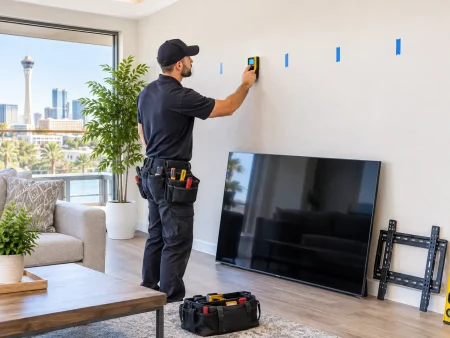
The wall surface is only part of the installation. The mount needs to be attached to a suitable supporting structure using the method and hardware specified by its manufacturer.
Wood-Stud Walls
Many mounts are designed to fasten into wood studs behind drywall. Stud spacing and the location of the studs affect where the TV can be placed. A mount with horizontal adjustment may provide some flexibility, but its installation instructions still determine where fasteners must go.
Masonry Walls
Brick and concrete installations require hardware and methods appropriate to the material and the mount. The condition and construction of the wall matter, so confirm the manufacturer supports masonry installation before proceeding.
Metal Studs or Unusual Walls
Metal studs, plaster, tile, stone veneer, and other wall assemblies may require a different mounting approach. Not every TV mount is approved for every wall type.
Don’t rely on ordinary drywall anchors alone unless the mount and anchors are specifically rated and approved for that exact installation. If you’re unsure about the wall construction, have it assessed before drilling.
Plan for Power and Cables
Think about where the power cord, streaming device, gaming console, and soundbar will go. A nearby outlet and enough cable length can make the difference between a clean installation and a collection of visible cords.
For concealed wiring, use products and methods approved for the purpose and compliant with local electrical requirements. Do not run a standard TV power cord inside a wall. If a new outlet or in-wall power solution is needed, consult a qualified electrician.
When Professional Installation Makes Sense
Consider a professional TV mounting service if:
- You’re unsure where the studs or supporting structure are located
- The wall is masonry, metal-stud, plaster, or another unfamiliar material
- The TV is large or difficult to lift safely
- You’re mounting above a fireplace or in a tight space
- The mount needs careful positioning for multiple viewing angles
- You want help planning cable placement
A qualified installer should confirm the TV and mount specifications, assess the wall, and follow the manufacturer’s instructions. If electrical work is needed, that may require a separate qualified electrician.
The right mount is the one that fits both the TV and the room. Check compatibility first, decide how much movement you need, and confirm the wall can support the installation before buying.

 8:00am – 6:00pm, Mon-Thur : 8:00am – 4:00pm, Fri-Sat: Sun-Closed
 Americanwood St, Las Vegas, NV 89130, United States



 Americanwood St, Las Vegas, NV 89130, United States
 savemorehm@gmail.com